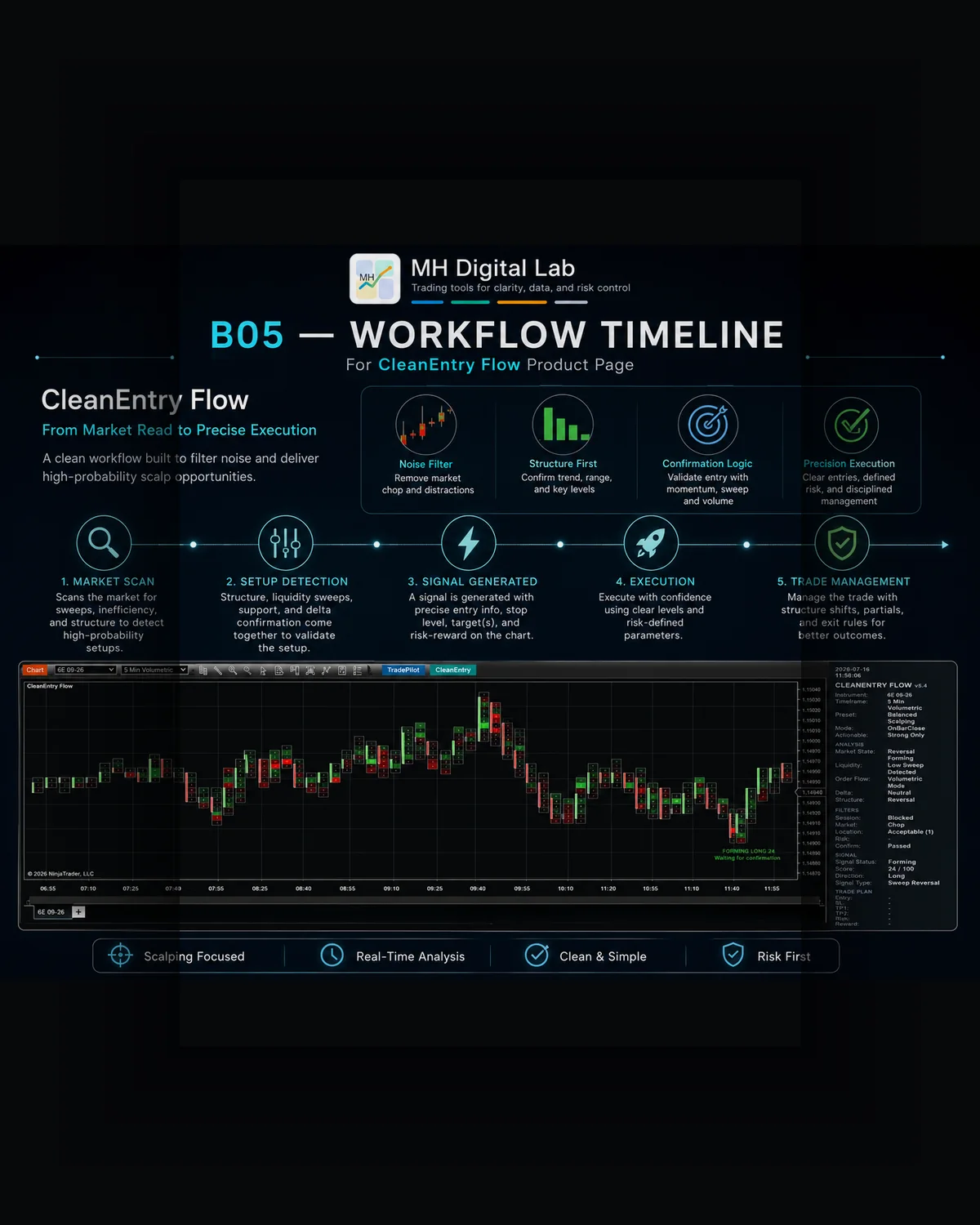
Turn order-flow evidence into a transparent, reviewable trade plan.
Built for short-term discretionary futures traders, CleanEntry Flow keeps the reasoning behind a setup visible from the first forming condition through classification, planning, alerts, and analytical review. The objective is not to produce more signals. It is to make every displayed signal easier to understand, filter, and evaluate.
CleanEntry Flow brings preparation, signal context, risk structure, and review into one focused NinjaTrader workflow.
Concept Preview
Concept visual for the CleanEntry Flow workflow.
01
Prepare
Organize market context, setup conditions, session information, and the logic behind a possible trade.
02
Structure
Keep entry, invalidation, risk, and target information visible in one focused plan.
03
Review
Record what developed, how the signal behaved, and what should be reviewed afterward.
Concept visual for the CleanEntry Flow workflow.
Product at a glance
Platform
NinjaTrader 8 on Windows
Product type
Signal-only workflow and decision support
Primary use
Short-term futures and scalp preparation
Execution
No automated or live order placement
Plan output
Entry, Stop, TP1, TP2, risk, and reward references
Review
Market Replay support and analytical outcome tracking
01See the full CleanEntry Flow decision process.This walkthrough follows the interface from data validation to market context, order-flow reasoning, filter checks, scoring, trade-plan generation, lifecycle management, alarms, and analytical results. The plan levels shown are analytical references, not working orders.
The walkthrough narration is in English. A complete written overview of the workflow is provided below the video.
10:27
Walkthrough chapters
Structured scalp workflow
A complete view of context, order flow, confirmation, planning, and review.
Data readiness
License, connection, volumetric input, Bid/Ask classification, and engine-data checks.
Market context and location
Market state, key zone, zone state, zone quality, and liquidity reference.
Order-flow reasoning
Liquidity, absorption, delta behavior, order flow, and structure are evaluated together.
Filters and scoring
Session, market, location, risk, and confirmation filters feed the score and classification.
Trade-plan generation
Projected Entry, Stop, TP1, and TP2 are displayed with risk and reward context.
Lifecycle and transparency
Signal state and the Reason field show what is present and what is still missing.
Quality, presets, and level modes
Signal thresholds, selectivity presets, and four methods for calculating plan levels.
Data, zones, alarms, and results
Operational data status, key-zone state, configurable alarms, and analytical outcome tracking.
02A signal is only useful when the trader can see why it exists.Short-term decisions often fail because data quality, location, order-flow evidence, confirmation, risk, and execution planning are judged separately. CleanEntry Flow brings those checks into one visible sequence and refuses to treat one attractive condition as a complete setup.
01
A chart may be open while required volumetric or Bid/Ask inputs are unavailable.
02
Price can reach an important location without enough confirmation to justify a plan.
03
Multiple order-flow signals can appear without a clear quality threshold or reason field.
04
Entry and risk levels may be improvised after the signal instead of structured beforehand.
05
Post-signal review becomes unreliable when outcomes and signal states are not tracked consistently.
03From data readiness to analytical review.The workflow progresses only when the available evidence supports the next stage. A setup may remain forming, become valid or strong, or stay blocked when required filters are missing.
01
Validate data
Check license status, connection, volumetric input, Bid/Ask classification, and internal engine readiness before analysis is trusted.
02
Read context and location
Identify market state, active key zone, zone lifecycle, zone quality, liquidity condition, and the structural location of price.
03
Evaluate order flow
Combine sweep behavior, absorption, delta divergence, buyer or seller pressure, and structure instead of relying on one isolated clue.
04
Apply filters
Validate session, market, location, risk, and confirmation rules before the candidate can progress.
05
Score and classify
Assign direction, signal type, a score out of 100, and a quality state such as Forming, Valid, or Strong.
06
Generate the plan
Project analytical Entry, Stop, TP1, and TP2 references together with risk and reward information.
07
Explain the lifecycle
Show whether the setup is forming, pending entry, protected, completed, blocked, or waiting for a specific confirmation.
08
Track and review
Follow outcomes after Entry is touched and summarize TP1, TP2, Stop, expiry, ambiguous results, win rate, and net R analytically.
04A transparent workflow, not a black-box alert.The right-side panel explains what the engine sees. The left-side panel summarizes the proposed plan, daily counts, and analytical results. On-chart notes connect the visible order-flow event to the current signal state.
Data readiness and context
The engine checks whether the environment can support the analysis before presenting a setup.
License and connection status
Volumetric and Bid/Ask readiness
Market state and active key zone
Zone state and quality
Liquidity and structural location
Order-flow reasoning
The setup is built from combined evidence rather than a single footprint event.
Liquidity sweep and reclaim behavior
Buyer or seller absorption
Delta confirmation or divergence
Order-flow pressure
Structural testing or reversal context
Signal quality and actionability
Candidates are scored, classified, and filtered according to the selected actionability threshold.
Direction and signal type
Score out of 100
Forming, Valid, and Strong states
Actionable-mode selection
Reason field for missing conditions
Structured trade plan
Plan levels remain visible as analytical references while the setup develops.
Projected Entry
Protected Stop
TP1 and TP2
Risk in ticks
Reward and R-multiple context
Configuration and selectivity
Presets and level modes let the trader control how selective the workflow is and how plan levels are calculated.
Conservative, Balanced, and Aggressive presets
Reversal-only and Continuation-only presets
Fixed-Ticks mode
Fixed Risk-to-Reward mode
Dynamic Structure mode
Hybrid mode
Alerts and review
Notifications and results support attention and analysis without replacing the trader's judgment.
Enable or disable alarms
Select and test a sound
Refresh the sound list
Track signal outcomes
Review win rate and net R as analytical summaries
05Signal state, score, and Reason fieldEvery candidate carries a direction, signal type, score, lifecycle, and plain-language reason. This lets the trader distinguish an early forming setup from a valid or strong setup and understand why a plan is still provisional or blocked.
01
Forming indicates that relevant evidence exists but required confirmation is incomplete.
02
Valid indicates that the configured baseline conditions have been satisfied.
03
Strong identifies a higher-scoring setup under the selected profile.
04
Actionable mode controls which classifications are counted and tracked.
05
The Reason field states the missing condition instead of hiding it behind a simple color or arrow.
Presets and level-calculation modes
Selectivity presets shape signal frequency, while level modes control how Entry, Stop, and Target references are projected. These settings change the workflow; they do not remove market risk.
01
Conservative, Balanced, and Aggressive profiles
02
Reversal-only and Continuation-only profiles
03
Fixed-Ticks levels based on predefined distances
04
Fixed Risk-to-Reward targets calculated from Entry-to-Stop distance
05
Dynamic Structure levels based on detected structure and context
06
Hybrid levels combining structural logic with fixed risk-and-reward constraints
06Analytical results, not broker-reported profitAfter Entry is touched, the Results Tracker follows TP1, TP2, Stop Loss, open, expired, and ambiguous outcomes. Win rate and net R are workflow summaries for review and are not broker statements, account balances, or guarantees of future performance.
01
Daily actionable, long, short, and strong-signal counts
02
Last actionable signal reference
03
TP1 and TP2 outcomes
04
Stop, open, expired, and ambiguous outcomes
05
Analytical win rate
06
Analytical net R
Designed for
Discretionary futures traders using short-term execution charts
Traders who want order-flow evidence explained in context
Traders who prefer selective, rule-based signals over frequent alerts
Traders who plan Entry, Stop, and Targets before acting
Traders who use Market Replay and structured review
Not designed for
Fully automated trading or automatic order placement
Guaranteed trade selection or guaranteed profitability
Replacing the trader's review of data, context, and execution conditions
Broker-reported performance accounting
Financial advice or removal of normal market risk
07Platform and data requirementsThe walkthrough demonstrates a NinjaTrader volumetric workflow with Bid/Ask classification. Final compatibility with a specific data provider, NinjaTrader license, instrument, and chart configuration must be confirmed before installation.
Platform
NinjaTrader 8
Operating system
Windows desktop
Market data
A compatible NinjaTrader real-time market-data connection
Order-flow input
Volumetric data and Bid/Ask classification for the workflow shown
Market depth
Not required in the configuration demonstrated in the walkthrough
Execution
Signal-only; no automated or live order placement
Plan levels
Analytical references, not working orders
Review
Market Replay and analytical outcome tracking supported
Development status
CleanEntry Flow remains in active development and validation. It is not currently available for purchase, and no commercial release date is announced.
08CleanEntry Flow FAQ
Does CleanEntry Flow execute trades?+
No. It is a signal-only decision-support workflow. Entry, Stop, TP1, and TP2 are analytical references and are not submitted as working orders.
What does the Data section verify?+
It verifies operational readiness such as license state, connection, volumetric input, Bid/Ask classification, and internal engine data before the analysis is trusted.
How does a signal become actionable?+
The candidate passes context, order-flow, session, market, location, risk, and confirmation checks, receives a score and classification, and must satisfy the selected actionability threshold.
What do Forming, Valid, and Strong mean?+
They describe the quality and completeness of the current setup. The Reason field explains what is present and what is still missing.
How are Entry, Stop, and Targets calculated?+
The product supports Fixed-Ticks, Fixed Risk-to-Reward, Dynamic Structure, and Hybrid level modes. The selected mode controls how the analytical plan levels are projected.
Can alarms be configured?+
Yes. The walkthrough shows controls to enable or disable alarms, choose a sound, test it, and refresh the available sound list.
What does the Results Tracker measure?+
It tracks analytical signal outcomes such as TP1, TP2, Stop, open, expired, and ambiguous states, together with review summaries such as win rate and net R. It is not broker-reported profit.
Can CleanEntry Flow be reviewed in Market Replay?+
Yes. Market Replay is supported for evaluating the workflow, signal lifecycle, plan presentation, and analytical outcomes.
Does it guarantee results?+
No. Signals, scores, order-flow evidence, and projected levels do not guarantee a profitable trade or future market behavior.
Risk and execution boundary
CleanEntry Flow provides software, signal presentation, analytical planning, and decision support. It does not provide financial advice, does not place orders automatically, does not report broker-confirmed profit, and does not guarantee signals, execution quality, or trading results. The trader remains responsible for data quality, configuration, order entry, risk, and every trading decision.